This document describes, end to end, how to stream TrueContext form submissions into a Microsoft Fabric Eventhouse (KQL database) and build a Real-Time Dashboard on top of them. It is layered:
• Sections 2 to 3 give the architecture and the single most important configuration decision, for a technical reader who wants the approach.
• Section 4 onward is a hands-on runbook with the exact settings, commands, and queries an implementer can follow.
The worked example uses a "Field Service Work Order" form, but the pattern applies to any TrueContext form.
2. Architecture overview

The pipeline has four stages:
1. TrueContext sends each submission as JSON to an HTTPS endpoint using an HTTP Data Destination.
2. Eventstream receives the JSON on a Custom endpoint (which is Event Hub-compatible) and routes it into the Eventhouse. This stays entirely inside Fabric, so no separate Azure subscription or Event Hubs resource is required.
3. Eventhouse lands the submission in a raw table, then exposes clean, query-ready shapes through stored functions.
4. The Real-Time Dashboard visualizes those functions, refreshing as new submissions arrive.
Why this design: TrueContext has no native Azure or Event Hubs connector, but its HTTP Data Destination (available on all tiers) can POST JSON to any HTTPS endpoint. Eventstream's Custom endpoint accepts that POST and is the lowest-friction bridge that keeps everything in Fabric.
3. The key decision: use "All Labels as Node Names"
This is the configuration choice that makes the whole integration clean, so set it deliberately.
When you create the TrueContext JSON Document, the Data Node Format setting controls how question/answer nodes are named. There are three options:
• Standard - pages, sections, and answers are JSON arrays with generic node names. You loop over them; you cannot address a specific answer by name.
• All Labels as Node Names - each page, section, and answer node is named by its label. Because labels are unique within a form, every answer becomes a uniquely named, directly addressable node.
• Flat Answer List - a flat list of answers with no page/section hierarchy.
Choose All Labels as Node Names. With it, the submission JSON arrives as nested dictionaries keyed by label:
"pages": {
"pJobDetails": {
"sections": {
"sOrderInfo": {
"answers": {
"qOrderNo": { "values": ["WO-000007"] }
}
}
}
}
}
In the Eventhouse you can then read any answer by its exact path, for example pages.pJobDetails.sections.sOrderInfo.answers.qOrderNo.values[0], and project it straight into a typed column. With the Standard format you would instead get arrays and have to expand and pivot them, which is more fragile. Mapping columns to answers, the goal of this integration, is what "All Labels as Node Names" delivers directly.
4. Prerequisites
• A Microsoft Fabric workspace with capacity that includes Real-Time Intelligence (Eventhouse, Eventstream, Real-Time Dashboard).
• TrueContext admin (or Can Create) access to the FormSpace that holds your form.
• The form you want to stream (here: "Field Service Work Order").
• Ability to run a small Python script locally to generate a SAS token, or another way to produce one.
TrueContext capabilities used here, the HTTP Data Destination and JSON Documents, are available on all tiers.
5. Runbook
Work in this order. The Eventhouse and its raw table should exist before TrueContext starts sending, so the destination has somewhere to land.
5.1 Create the Eventhouse and raw table
5. In your Fabric workspace, select + New item then Eventhouse, name it (for example FieldService). This creates a KQL database of the same name.
6. Open the KQL database and run the raw table definition:
.create table WorkOrdersRaw (document: dynamic)
.alter table WorkOrdersRaw policy ingestiontime true
The table starts with a single document column. When Eventstream connects with auto-mapping (Section 5.4) it adds typed columns for the top-level fields (identifier, referenceNumber, form, geoStamp, and a pages dictionary). That is expected and fine.
5.2 Create the Eventstream and its Custom endpoint
7. + New item then Eventstream, name it (for example WorkOrdersStream).
8. Add source then Custom endpoint, name it truecontext-in.
9. Open the source and select the Event Hub tab. Copy the connection string (primary key); you will need it for the SAS token. Keep it secret.
10. Leave the destination for Section 5.4; first set up TrueContext so you can test the flow once the destination is attached.
5.3 Configure TrueContext
5.3.1 Create the JSON Document (All Labels as Node Names)
11. In TrueContext: Forms & Integrations then Documents then Create Document.
12. Choose document type JSON.
13. Give it a name (for example Eventhouse JSON).
14. Under JSON Document Configuration, set Data Node Format = All Labels as Node Names. This is the key setting from Section 3.
15. Optional: enable Embed attachments only if you need image/signature bytes downstream (it increases payload size).
16. Set the Document Time Zone Source as appropriate; it controls the shifted timestamp values.
17. Select Create.
5.3.2 Generate the SAS token for the endpoint
The Eventstream Custom endpoint is Event Hub-compatible, so TrueContext authenticates to it with a Shared Access Signature (SAS) token in the Authorization header. Generate one from the connection string you copied in 5.2 (run locally so the key never leaves your machine):
import base64, hashlib, hmac, time, urllib.parse
NAMESPACE_HOST = "<namespace>.servicebus.windows.net"
EVENT_HUB = "<entity path / hub name>"
KEY_NAME = "<SharedAccessKeyName>"
KEY = "<SharedAccessKey>"
TTL_DAYS = 365
uri = urllib.parse.quote(f"https://{NAMESPACE_HOST}/{EVENT_HUB}".lower(), safe="")
expiry = int(time.time()) + TTL_DAYS * 86400
sig = urllib.parse.quote(base64.b64encode(
hmac.new(KEY.encode(), f"{uri}\n{expiry}".encode(), hashlib.sha256).digest()), safe="")
print(f"URL: https://{NAMESPACE_HOST}/{EVENT_HUB}/messages?timeout=60&api-version=2014-01")
print(f"Authorization: SharedAccessSignature sr={uri}&sig={sig}&se={expiry}&skn={KEY_NAME}")
The token has a hard expiry. Pick a long window and set a reminder to rotate it; a 401 from the endpoint usually means it lapsed.
5.3.3 Create the HTTP Connection and Data Destination
18. Forms & Integrations then Connections then Create Connection then HTTP. Base URL = the messages?... URL printed by the script. Add a custom header Authorization with the SharedAccessSignature ... value. Save.
19. Forms & Integrations then Data Destinations then Create Data Destination then HTTP. Basics: name it, select the FormSpace, choose the HTTP Connection above.
20. Request Configuration: Method POST; request header Content-Type: application/json; charset=utf-8; request body = Attach a Document that defines the request body.
21. Response Configuration: set success code 201 (Event Hubs returns 201 on a successful send).
22. Add the Data Destination to the form, attach the JSON Document from 5.3.1, and link it to the form.
5.4 Finish the Eventstream destination
23. In the Eventstream (edit mode), Add destination then Eventhouse. Ingestion mode: Direct ingestion. Database: FieldService; Destination table: WorkOrdersRaw. Data format: JSON. Let Eventstream auto-map columns (this populates the top-level columns and the pages dictionary).
24. Connect the source to the destination and Publish.
5.5 Test the flow
Submit a test form in TrueContext. In the TrueContext submission view, confirm the Data Destination reported success (201). After a minute, confirm the row landed:
WorkOrdersRaw | project ingestion_time(), id = tostring(identifier) | sort by ingestion_time() desc | take 5
5.6 Build the query-ready shapes (stored functions)
Because the JSON uses "All Labels as Node Names," every answer is addressable by path, so the cleanest model is two stored functions that compute live from WorkOrdersRaw. They always reflect the latest data with no materialization to maintain.
WorkOrdersWide returns one row per work order with each question as a typed column. WorkOrderParts returns one row per part from the repeatable "Parts Used" section (whose rows are a JSON array, so they are expanded). The full definitions are in the companion file work_order_eventhouse_schema_v5.kql; the core of the wide function is:
.create-or-alter function WorkOrdersWide() {
WorkOrdersRaw
| extend P = pages, F = form, G = geoStamp
| project
DocumentId = tostring(identifier),
State = tostring(state),
SubmitDate = todatetime(serverReceiveDate),
OrderNo = tostring(P.pJobDetails.sections.sOrderInfo.answers.qOrderNo.values[0]),
Customer = tostring(P.pJobDetails.sections.sCustomerInfo.answers.qCustomer.values[0]),
Asset = tostring(P.pJobDetails.sections.sAssetInfo.answers.qAsset.values[0]),
Priority = tostring(P.pJobDetails.sections.sOrderInfo.answers.qPriority.values[0]),
LabourMillis = tolong(P.pTimeOnSite.sections.sTimeCapture.answers.LabourHours.values[0].millis),
Outcome = tostring(P.pSignOff.sections.sOutcome.answers.qCompletionStatus.values[0]),
Latitude = toreal(G.coordinates.latitude),
Longitude = toreal(G.coordinates.longitude)
// remaining questions follow the same path pattern
}
To extend the model when the form changes, add a line with the new question's path. Paths follow pages.<pageLabel>.sections.<sectionLabel>.answers.<questionLabel>.values[0].
5.7 Build the Real-Time Dashboard
25. + New item then Real-Time Dashboard, then Manage then Data sources then Add your FieldService database.
26. Add a tile per visual; paste the query, run it, and pick the visual type. Examples:
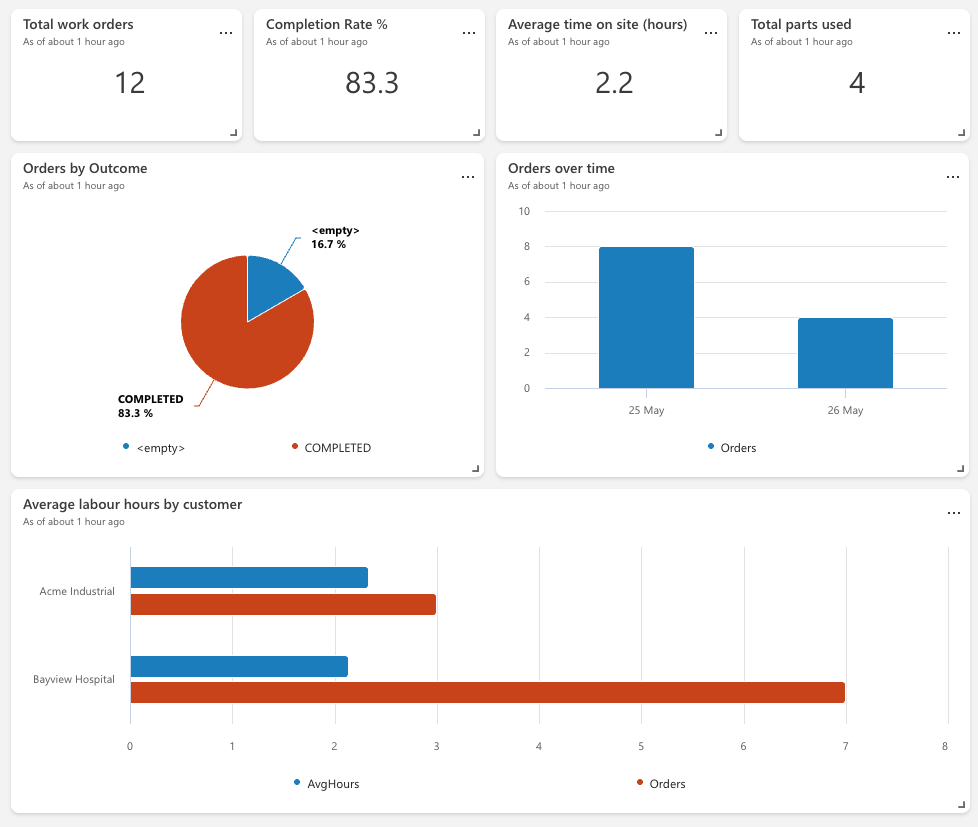
// KPI: total orders (Stat)
WorkOrdersWide | summarize ['Total Orders'] = count()
// Orders by outcome (Pie/Column)
WorkOrdersWide | summarize Orders = count() by Outcome | sort by Orders desc
// Orders over time (Column/Time chart)
WorkOrdersWide | summarize Orders = count() by Day = bin(SubmitDate, 1d) | sort by Day asc
// Avg labour hours by customer (Bar)
WorkOrdersWide | where isnotnull(LabourMillis)
| summarize AvgHours = round(avg(LabourMillis)/3600000.0, 2) by Customer | sort by AvgHours desc
// Job locations (Map)
WorkOrdersWide | where isnotnull(Latitude) | project OrderNo, Customer, Outcome, Latitude, Longitude
// Parts usage (Bar/Table)
WorkOrderParts | summarize TotalUsed = sum(QuantityUsed) by PartNumber, PartDescription | sort by TotalUsed desc
27. Optionally add a Time range parameter linked to SubmitDate and append | where SubmitDate between (_startTime .. _endTime) to time-sensitive tiles.
28. Save and set an auto-refresh interval. The full tile set is in the companion file work_order_dashboard_guide.md.
6. Design notes and lessons
• "All Labels as Node Names" is the linchpin. It turns answers into directly addressable, label-keyed nodes, which is what lets columns map to answers. The Standard format produces arrays and generic names and is harder to work with for this purpose.
• Keep the raw table, derive everything else. Landing the full submission in WorkOrdersRaw is lossless. The wide and parts shapes are derived as live functions, so you can change or extend them without re-ingesting.
• Functions over update policies for this workload. Update policies do not fire reliably on the streaming ingestion that Eventstream uses, so live functions (or materialized views, once the data shape is known) are the dependable choice. Functions recompute on query, which is ideal at work-order volumes and never falls behind.
• Repeatable sections are arrays. Page/section/answer nodes are dictionaries under "All Labels as Node Names," but a repeatable section's rows remain a JSON array, so expand rows (for example with mv-expand) and read each row's answers by path.
• Some fields appear only sometimes. dispatchDate and dispatcher are present only for dispatched records; geoStamp only when the form has a form-level geostamp. Read them defensively (a missing path yields null, which tostring() renders as empty).
• Rotate the SAS token. It expires; a 401 at the destination is the usual symptom. Re-run the generator and update the HTTP Connection header.
Example Real-Time Dashboard:
8. References
TrueContext - Form Submission Formats: Standard vs. Labels as Node Names: https://docs.truecontext.com/1374411/Content/Published/217501288.html
TrueContext - JSON Documents: https://docs.truecontext.com/1374411/Content/Published/217501208JSONDocuments.html
TrueContext - HTTP Data Destination: https://docs.truecontext.com/1374411/Content/Published/217499958_HTTPPOSTPUTPATCHDataDestination.html
TrueContext - Data Destinations Overview: https://docs.truecontext.com/1374411/Content/Published/217500098_DataDestinationsOverview.html
Microsoft Fabric - Add a Custom Endpoint source to an Eventstream: https://learn.microsoft.com/en-us/fabric/real-time-intelligence/event-streams/add-source-custom-app
Microsoft Fabric - Add an Eventhouse destination to an eventstream: https://learn.microsoft.com/en-us/fabric/real-time-intelligence/event-streams/add-destination-kql-database
Microsoft Fabric - Create a Real-Time Dashboard: https://learn.microsoft.com/en-us/fabric/real-time-intelligence/dashboard-real-time-create
Microsoft Kusto - Create materialized view: https://learn.microsoft.com/en-us/kusto/management/materialized-views/materialized-view-create
------------------------------
Ian Chamberlain
Solutions Architect
TrueContext
------------------------------